
If you’ve spent any time in self-publishing circles, you’ve seen the standard reader magnet: a PDF checklist, a bonus chapter, a resource list. Readers download them, skim once, and forget them by the following week. I did this too, for years, and it did almost nothing for me.
Then I noticed something about my own catalog. I write a series of personal finance books, and a lot of the ideas inside them aren’t really “read once and remember it” ideas. They’re calculations. How many years until I hit financial independence. Which debt to pay off first, and how much interest that decision costs me. Questions like that have a number attached — which means you can hand someone a tool to compute the number, instead of a paragraph to read and forget.
So I started building small, free web calculators, one tied to each book in the series. Here’s what that process has looked like, what it actually cost, and what I’d tell another author about doing the same thing.
Why a calculator beats a checklist
A checklist tells a reader what to do. A calculator shows them where they stand right now, with their own numbers. That’s a different kind of engagement. It gives someone a reason to type something in and hit a button, instead of scrolling past.
It also works as a demo. If someone plugs their numbers into a “years to financial independence” calculator and gets a real, specific answer back, they’ve just experienced the core idea of the book firsthand, in about ninety seconds. That’s a stronger pitch for the book than any back-cover blurb.
The catch is that it only works if the tool maps to something genuinely numeric in the book. Not every concept fits. Pick the one idea that’s naturally a calculation — don’t force a general theme into a slider just because you want a tool.
The cost: basically nothing
Before getting into how the tools work, it’s worth being upfront about what they cost, because I think this surprises people: the only expense in the entire setup is the WordPress subscription I already had before I started any of this, for hosting my author site.
Everything the tools themselves run on — hosting, the calculation logic, the email list, sending the results email — is free at the scale a reader-magnet tool actually needs. This isn’t a “spend money to make money” project. It’s closer to “spend a few afternoons.”
Start with one, keep it simple
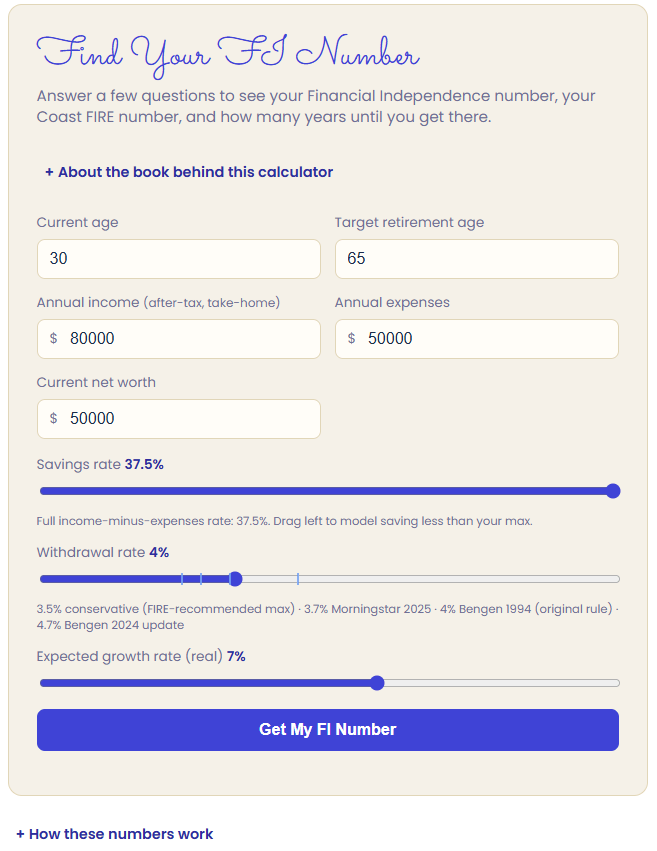
My first tool was a FIRE calculator, tied to my financial-independence book: enter some basic numbers about income, spending, and savings, and it tells you roughly how many years out you are. No accounts, no dashboard, nothing beyond that one answer.
It would have been easy to make that first build more ambitious than it needed to be. I kept it narrow on purpose. Its job wasn’t to be polished — it was to prove the model worked at all, and to give me one finished example to build the rest from.
Turn the first tool into a template
This is where the real time savings show up. Once the first tool existed, the second one wasn’t a build from scratch — it reused the same visual style, the same layout, the same email-capture flow. My debt payoff calculator (avalanche vs. snowball) came together noticeably faster than the first one, simply because I wasn’t re-deciding things I’d already decided.
For anyone curious about the mechanics: each tool runs on Cloudflare Pages for hosting, with a small Cloudflare Worker handling the calculation and talking to the email service. Subscriber capture and tagging goes through Kit (formerly ConvertKit), and the results email itself sends through Resend. None of this requires much developer background to set up, and once the first tool defines the pattern, wiring up the next one is mostly copying and adjusting rather than building new.
The plumbing matters more than the tool
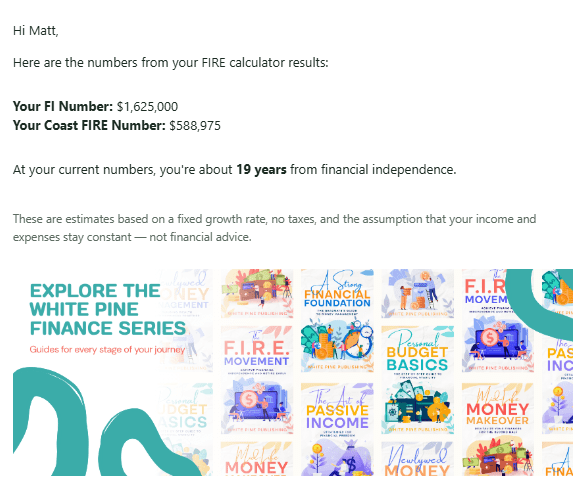
Here’s the part that’s easy to skip: capturing the email, tagging the subscriber by which tool and book brought them in, and sending a results email that gives them something useful rather than a generic “thanks for subscribing.” That’s most of the real value. The calculator earns someone’s attention for thirty seconds; the follow-up email is what turns that thirty seconds into someone on your list.
It’s tempting to put all your effort into the tool and treat the email as an afterthought. I’d argue the opposite is true: a plainer calculator with a genuinely good follow-up will outperform a beautiful calculator that just says thanks and goes quiet.
What this looks like across a series
All six books in the series now have a tool live, listed together on a single tools page — someone who lands on the debt calculator for one book can see, right there on the same page, that there are five more books in the series with tools of their own. That cross-visibility wouldn’t exist if each tool lived in isolation on its own page.
The other payoff showed up as I worked through the rest of the series. Each new tool got faster to build than the one before it, because the hosting, the email pipeline, and the visual template were already decided. The first one is the only one that has to start from zero — every tool after it is mostly copying and adjusting a known pattern.
If you’re starting today
- Find a number-driven idea in your book — an actual calculation a reader could run with their own numbers, not a theme you’re stretching to fit.
- Build the simplest version of it: one input screen, one clear result, nothing else.
- Expect the first one to take longer. That’s not a sign you’re doing it wrong — it’s just the one where every decision (hosting, layout, email flow) has to get made for the first time. The second one goes much faster.
- Get the email capture and a real follow-up message working before you spend more time polishing the design.
It costs a few afternoons and whatever you’re already paying to host your site. Unlike a checklist, it’s still doing its job six months from now.
 White Pine Publishing
Leave a comment